Auto Layout Without Constraints
해당 글은 아래 글을 번역한 것이다.
Stack views provide an easy way to leverage the power of Auto Layout without introducing the complexity of constraints. A single stack view defines a row or column of user interface elements. The stack view arranges these elements based on its properties.
스택 뷰는 복잡한 제약 조건을 도입하지 않고도 오토 레이아웃의 기능을 쉽게 활용할 수 있는 방법을 제공한다. 싱글 스택 뷰는 유저 인터페이스 요소들을 행 또는 열로 정의한다. 스택 뷰는 속성에 따라 요소들을 정렬한다.
- axis: (UIStackView only) defines the stack view’s orientation, either vertical or horizontal.
- orientation: (NSStackView only) defines the stack view’s orientation, either vertical or horizontal.
- distribution: defines the layout of the views along the axis.
- alignment: defines the layout of the views perpendicular to the stack view’s axis.
- spacing: defines the space between adjacent views.
- axis: 스택 뷰의 방향을 수직(vertical) 또는 수평(horizontal)으로 정의한다.
- orientation: 스택 뷰의 방향을 수직(vertical) 또는 수평(horizontal)으로 정의한다.
- distribution: 축(axis)을 따라 뷰의 레이아웃을 정의한다.
- alignment: 스택 뷰의 축(axis)의 수직인 뷰의 레이아웃을 정의한다.
- spacing: 인접한 뷰 사이의 공간을 정의한다.
To use a stack view, in Interface Builder drag either a vertical or horizontal stack view onto the canvas. Then drag out the content and drop it into the stack.
스택 뷰를 사용하려면 인터페이스 빌더에서 수직 또는 수평 스택 뷰를 캔버스로 드래그 한다. 그런 다음 컨텐츠를 끌어서 스택에 놓는다.
If an object has an intrinsic content size, it appears in the stack at that size. If it does not have an intrinsic content size, Interface Builder provides a default size. You can resize the object, and Interface Builder adds constraints to maintain its size.
객체에 고유한 컨텐츠 사이즈가 있는 경우 해당 크기로 스택에 나타난다. 고유한 컨텐츠 사이즈(intrinsic content size)가 없으면 인터페이스 빌더는 기본 크기를 제공한다. 객체의 크기를 조정할 수 있으며 인터페이스 빌더는 크기를 유지하기 위해 제약 조건을 추가한다.
To further fine-tune the layout, you can modify the stack view’s properties using the Attributes inspector. For example, the following example uses an 8-point spacing and a Fills Equally distribution.
레이아웃을 더욱 세부적으로 조정하려면 속성 검사기를 사용하여 스택 뷰의 속성을 수정할 수 있다. 예를 들어 다음 예에서는 8포인트 간격(spacing)과 균등하게 채우기 분포를 사용한다.

The stack view also bases its layout on the arranged views’ content-hugging and compression-resistance priorities. You can modify these using the Size inspector.
또한 스택 뷰는 배열된 뷰들의 컨텐츠 허깅(content-hugging)과 압축 저항 우선순위(compression-resistance priorities)에 따른 레이아웃을 기반으로 한다. 이는 사이즈 인스펙터(Size inspector)를 사용해 수정할 수 있다.
You can further modify the layout by adding constraints directly to the arranged views; however, you want to avoid any possible conflicts: As a general rule of thumb, if a view’s size defaults back to its intrinsic content size for a given dimension, you can safely add a constraint for that dimension. For more information on conflicting constraints, see Unsatisfiable Layouts.
정렬된 뷰들에 제약 조건을 직접 추가하여 레이아웃을 수정할 수 있다. 그러나, 가능한 충돌을 피하는 것이 좋다.
일반적으로, 뷰의 사이즈가 지정된 차원에 대한 고유 컨텐츠 사이즈로 기본적으로 설정되는 경우, 해당 차원에
대한 제약 조건을 안전하게 추가할 수 있다. 제약조건 충돌에 대한 더 많은 정보는 Unsatisfiable Layouts 을
참조하자.
Additionally, you can nest stack views inside other stack views to build more complex layouts.
추가적으로, 스택 뷰 안에 다른 스택 뷰를 중첩하여 복잡한 레이아웃을 만들 수도 있다.
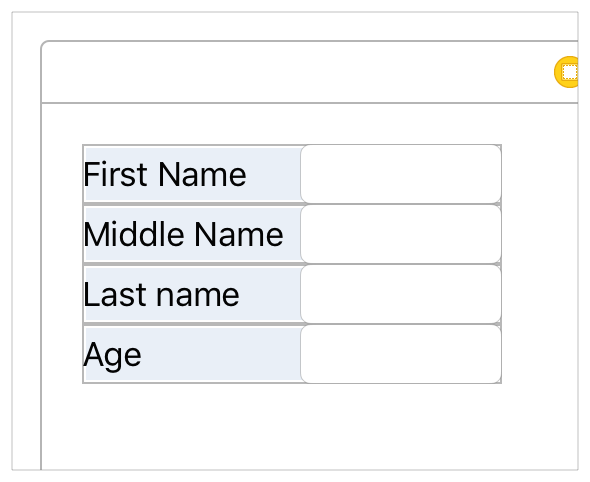
In general, use stack views to manage as much of your layout as possible. Resort to creating constraints only when you cannot achieve your goals with stack views alone.
일반적으로 레이아웃을 관리할 때 최대한 많이 스택 뷰를 사용하자. 스택 뷰만으로는 목표를 달성할 수 없는 경우에만 제약 조건을 생성하자.
For more information on using stack views, see UIStackView Class Reference or NSStackView Class Reference.
스택 뷰 사용에 대한 더 많은 정보는, UIStackView Class Reference 나 NSStackView Class Reference 를
참조하자.
Although the creative use of nested stack views can produce complex user interfaces, you cannot completely escape the need for constraints. At a bare minimum, you always need constraints to define the position (and possibly the size) of the outermost stack.
중첩된 스택 뷰를 창의적으로 사용하면 복잡한 유저 인터페이스를 생성할 수 있지만 제약 조건의 필요성을 완전히 피할 수는 없다. 최소한으로 하더라도 가장 바깥쪽 스택의 위치(및 크기)를 정의하려면 항상 제약 조건이 필요하다.